Stop vibe-coding. Start building with Blueprint.

Blueprint helps developers craft precise AI coding prompts so your coding agent produces production-ready code.

Try Blueprint

Features

Browse and create instruction sets, assemble blueprints, and generate precise, consistent prompts for your coding agent.

Browse pre-built instruction sets

Blueprint provides a library of pre-built instruction sets for common programming languages and frameworks.

  • 1 Filter by language and framework to find the right instruction sets for your project.
  • 2 Inspect the instrunction sets to see how it works.
  • 3 Copy instrunction sets and customize them for your needs.
Instruction Sets

Create accurate prompts

Select one or more instruction sets and generate a blueprint that is ready to be used by your coding agent.

Selected Instruction Sets

Convert functional requirements into EARS statements

Turn vague feature ideas into precise, machine-readable specs. Paste your description, and Blueprint rewrites it in EARS format — clear, atomic, and ready for your coding agent to implement.
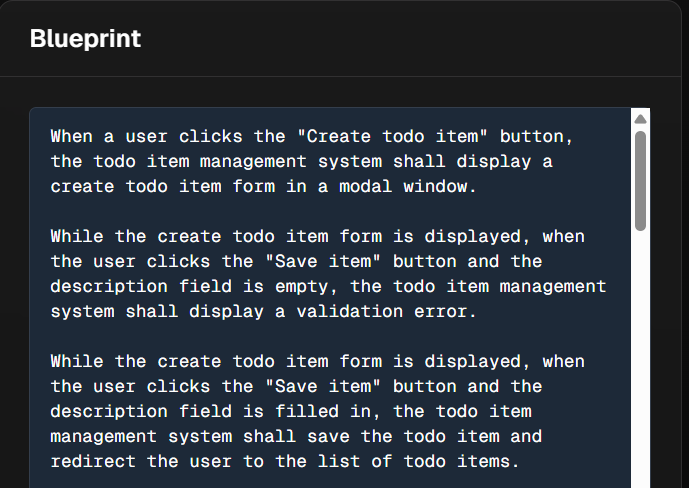
EARS format

Generate and use your blueprint

Assemble requirements and instruction sets into one structured prompt. Copy it or open it directly in your coding agent.
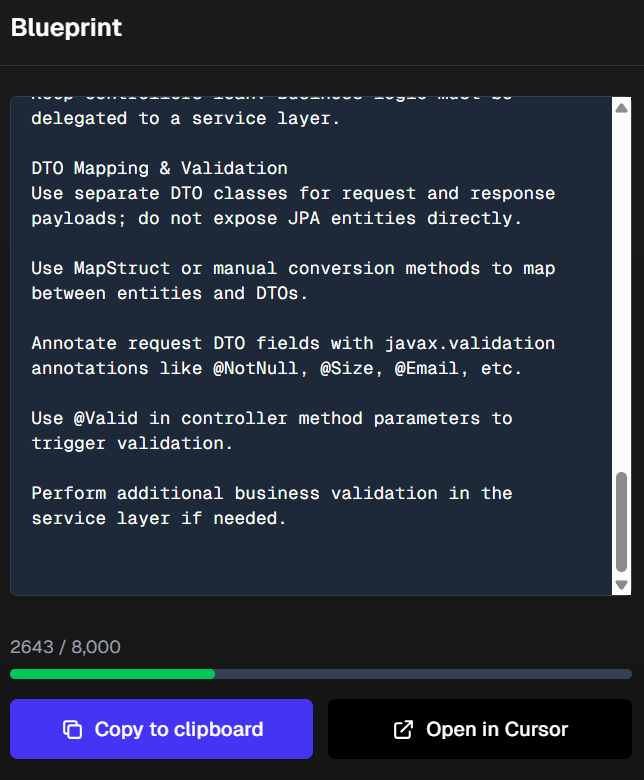
Use Blueprint

How Blueprint Works

A simple workflow takes you from vibe-coding hell to AI generated production-ready code.

1

Browse & create instruction sets

Browse the existing instruction sets for your tech stack, copy & modify them or create your own sets from scratch for your needs.

2

Create a blueprint

Describe your desired code changes. Write a functional description, select instruction sets with technical instructions, and add file-scope limits.

3

Use your prompt

Use your generated prompt by opening it directly in Cursor or copy & paste it in your preferred AI coding IDE.

Pricing

One subscription with everything you need to improve your AI coding productivity.

Blueprint Pro

$19 / month

Unlimited blueprint creation, access to the entire instruction set library, and export-ready prompts for Cursor, Copilot, or any other coding agent. Cancel anytime.

Frequently Asked Questions

Answers to the most common Blueprint questions.

Why should I use this over AGENTS.MD?

Unlike AGENTS.MD, Blueprint lets you build prompts per feature — not one massive document. You can browse pre-built instruction sets, assemble only what’s relevant, and generate cleaner, faster, more accurate AI outputs.

Who should use Blueprint?

Blueprint is built for software engineers who care about clean, maintainable code and don’t want to write every AI prompt from scratch.

What's the difference between an instruction set and a blueprint?

An instruction set is a resuable set of precise instructions for your coding agent on how to write code. A blueprint is a prompt for your coding agent consisting of functional requirements and one or more instruction sets.

How does Blueprint improve over just writing prompts manually?

Blueprint includes pre-built instruction sets that help you generate structured, high-quality prompts. This ensures your coding agent outputs production-ready code without the trial-and-error of manual prompt writing.

What is EARS?

EARS stands for Easy Approach to Requirements Syntax. It's a structured way to write functional requirements for your coding agent.

Which programming languages or frameworks are supported?

Blueprint supports all programming languages and frameworks. You can create instruction sets for any language or framework you use. The currently available instruction sets are mostly related to Java (Spring Boot) and TypeScript (NextJS)

Ready to improve your AI coding?

Get started free — generate up to 10 Blueprints, no credit card required. Continue with Blueprint Pro for just $19 a month. Cancel anytime.

Try Blueprint for free